Explore every answer on the map in Farflung
By Farflung ·
See the countries you missed, read the facts behind their answers and return to older expeditions from your Logbook.
After five pins, the question is what else would have counted. The answer map shows you, one country at a time.
Read the facts on the map
- After the fifth result, choose On to camp.
- Open one of the five prompts. Its answers are listed by rarity, Farflung first.
- Tap a dotted country name, or a highlighted country on the map. The map flies there and opens that country’s card. On a phone, Show on map brings the map and its card into view.
- Step through the cards with the arrows, or swipe on a phone.
A dotted name has a fact to read. A gem’s card says why that surprising answer counts, and countries that share a fact share a card.
Past-prompt spoilers: the example below shows every answer to Expedition #9’s Mekong prompt, from 13 October 2026.
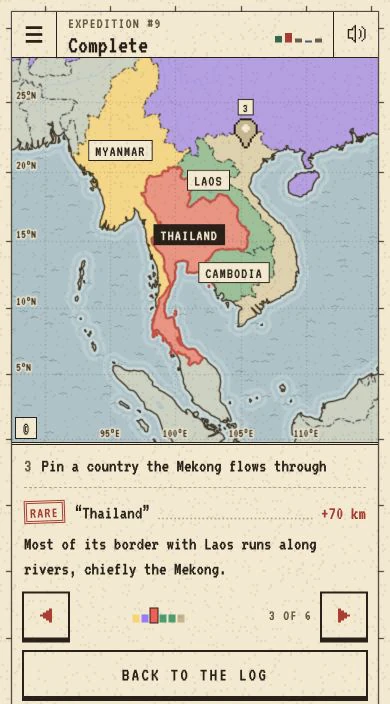
Some older answers have no written fact yet. They still appear on the map with their rarity and distance.
Reopen a day from your Logbook
Open Logbook in the game menu and choose a day you have played. Tap one of your pins to open that prompt, or choose Show this day’s answers for the day’s list. Its answer map works as today’s does, and the date controls step between the days you have played.
Looking back does not change your result.